Alternatively, if you're interested in sophisticated DSP functions such as upsampling, downsampling, equalization, room correction, and so on, at high sample rates, you're going to need a faster box. Choose a computer with an 8th or 9th Generation Intel i7 or i9 processor (or the equivalent AMD Ryzen CPU), with fast RAM and a solid-state drive for storing the OS and programs. You can buy a so-called silent or quiet PC from the Internet, build your own, or buy a purpose-built computer constructed by a specialist for dedicated audio use. That last option is the easiest way to assure that your playback hardware will perform as intended, but it's also the most expensive (footnote 2).
MUSIC PLAYER SOFTWARE: Choosing software is complicated, if only because there are too many options. Just make sure that the software explicitly supports discrete multichannel files in PCM and/or DSD. Many say they have multichannel support but in fact support only compressed formats like DTS or Dolby, which target the home theater market.
Try as many programs as you can, using free-trial options where available; although it's debatable whether any real sonic differences exist, some will have more subjective appeal than others. Play with their display screens, search functions, and playlist options, as this is how you will interact with them. Pick what you like and know you can always change to another. I like JRiver Media Center and Roon. They offer complementary virtues.
GETTING THE SOUND TO THE SOUND SYSTEM: There are myriad ways to get files from your server to your system, and they fall into four general categories. The first, which should be avoided if at all possible, is to take the signal from the motherboard's sound outputs—a poor-sounding alternative, especially if the outputs support only direct output via the operating system. A better idea is to take the output from a computer soundcard: Audiophiles may reflexively sneer at this idea, but John Atkinson has favorably reviewed a few consumer/gaming soundcards, and a number of professional/studio cards can be presumed to be suitable. Better still—even if compromised, as already mentioned— is to go from an HDMI output to an HDMI input on an AV receiver or preamp-processor, which is easy to do and can work well: If you have an AVR, I suggest you try it—the caveat being that the resulting sound quality will depend on the processing and D/A conversion in the AVR. With rare exceptions, they do not compete with what one can achieve with an external DAC.
 The fourth and best option is to send the output via USB, Ethernet, or I2S to an external DAC. (Any of those three types of data link is fine.) Yes, there are really only three multichannel consumer DACs on the market today, but the miniDSP U-DIO8 multichannel interface—a $299 box—lets you hook up any three or four stereo DACs that suit your taste and pocketbook.
Merging + Anubis Multichannel Monitor Controller/DAC
The fourth and best option is to send the output via USB, Ethernet, or I2S to an external DAC. (Any of those three types of data link is fine.) Yes, there are really only three multichannel consumer DACs on the market today, but the miniDSP U-DIO8 multichannel interface—a $299 box—lets you hook up any three or four stereo DACs that suit your taste and pocketbook.
Merging + Anubis Multichannel Monitor Controller/DAC
From Merging Technologies comes a new product that will fill a gap in the multichannel DAC market (footnote 3). The only catch: The Anubis doesn't fit precisely into any common category that readers would easily recognize. Merging designed the Anubis to serve as a monitor controller in an audio-production studio and to interact, via the RAVENNA/AES67 audio-over-Internet protocol, with their Hapi or Horus processors, which encompass up to 128 audio channels and many hundreds of additional I/O channels. The Anubis comes in two variants, Pro ($1599) and Premium ($2099), which differ only in the formats and sample rates they support; the Pro supports PCM up to 32/192, while the Premium supports PCM up to 32/384 (including DXD352.8) and DSD64, DSD128, and DSD256.
 Since this doesn't directly relate to what the audiophile/music lover needs, why did I jump on the Merging team to send me an Anubis Premium? Bearing in mind the above-mentioned format throughput, I noted that the Anubis will accept an 8-channel stream via Ethernet, has outputs that can be configured for up to eight monitors, and has a volume control. To me, that says: multichannel DAC!
But that's not all. The Anubis has two stereo headphone outputs and two pairs of analog inputs, one of which is configurable for microphones. That means you can feed in two stereo sources of your choice (phono preamp, FM tuner, etc.) and enjoy them on speakers or headphones. Thus the Anubis can be at the core of a multichannel audio system where multichannel and stereo sources converge, and control the output to amps and speakers. All this in a package that's about the size of three Blu-ray disc boxes!
Since this doesn't directly relate to what the audiophile/music lover needs, why did I jump on the Merging team to send me an Anubis Premium? Bearing in mind the above-mentioned format throughput, I noted that the Anubis will accept an 8-channel stream via Ethernet, has outputs that can be configured for up to eight monitors, and has a volume control. To me, that says: multichannel DAC!
But that's not all. The Anubis has two stereo headphone outputs and two pairs of analog inputs, one of which is configurable for microphones. That means you can feed in two stereo sources of your choice (phono preamp, FM tuner, etc.) and enjoy them on speakers or headphones. Thus the Anubis can be at the core of a multichannel audio system where multichannel and stereo sources converge, and control the output to amps and speakers. All this in a package that's about the size of three Blu-ray disc boxes!
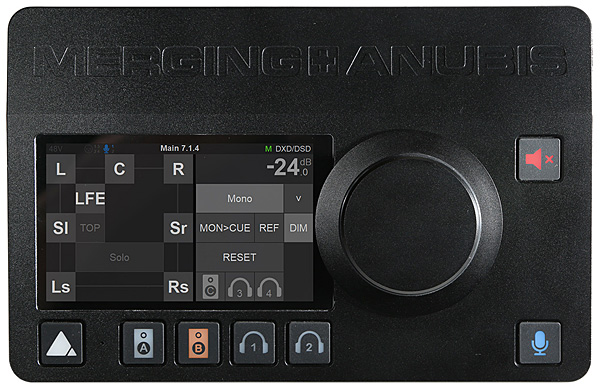 A bright but dimmable multitouch display and a large encoder knob that functions as volume control, as well as for multiple trims and settings, dominate the top of the Anubis. Below the display, from left to right, are buttons for Home (main menu cycling and settings access), Speaker A (selects a preset monitor configuration), Speaker B (ditto), Headphones 1, and Headphones 2. On the right top is the Mute button and below it is the Talkback control that accesses a small omnidirectional microphone positioned between the Home and Speaker A buttons. I cannot think of any home use for this function unless you want to warn everyone within hearing that you are going to play something loud !
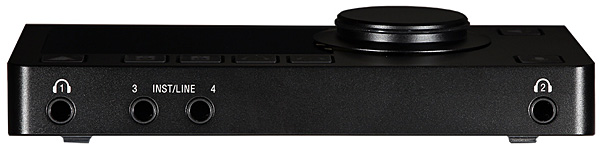
 At the back, we see the power switch, Kensington security slot, and DC power jack clustered at the left. Next to those are a locking Ethercon network connector, a pair of jacks for MIDI and GPIO functions, 2 TRS ¼" jacks (Line 3-4 outputs), 2 XLR jacks (Main 1-2 outputs) and, finally, two combo XLR/TRS inputs for mike/line sources. Looking at the front, the Headphones 1 jack is on the left and next to it is a pair of ¼" line-level jacks; on the far right is the Headphones 2 jack. There's also a microphone stand socket (European thread) on the bottom of the Anubis and low-noise fan vents on the two side panels. (The fan's not just quiet: At its Mid and Low settings, it's pretty much silent.)
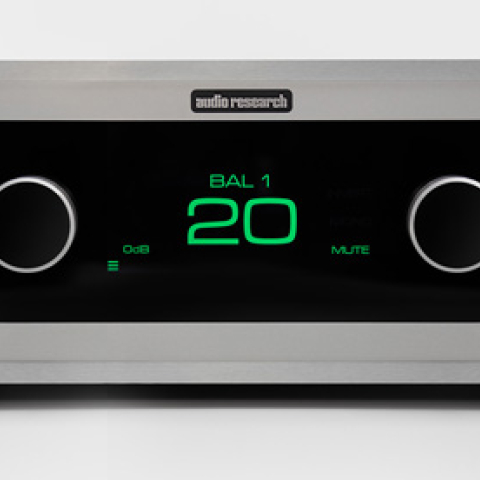
My plan for putting the Anubis to work: connect its Main 1-2 XLR outputs to the FrontLeft and FrontRight inputs of my Audio Research MP1 preamp; connect a pair of 0.5m-long ¼" TRS-to-XLR adapters from the Line Outputs 3-4 to the Center and LFE preamp inputs; and connect a 0.5m-long ¼" TRS-to-Dual XLR Y-adapter from the Headphones 1 jack to the SurroundLeft and SurroundRight inputs (footnote 4).
Finally, I plugged in the LAN Ethernet cable and attached the power supply. The Anubis powered up. Having used the Merging NADAC+, I knew to install Merging's ASIO driver on my server and configure both JRiver and Roon to use it. JRiver and Roon saw the driver and, indeed, tried to send out music, but the Anubis just sat there. I knew it was alive (it lit up!) and that it was on the network, because I could use my browser to access its webpage and adjust the settings—but the silence was deafening. I called for help.
It took about 45 minutes on Skype and VPN for Dominique Brulhart, Merging Technologies' head of software development, to guide me through the setup. The procedure turned out to be not too difficult, but there is no simple menu or guide. As the Anubis comes from the factory, its inputs, outputs, and internal processes are not connected, and one must use Merging's Audio Network Manager (ANEMAN) web app to route the signals to and through the Anubis. After a bit of clicking on the ANEMAN graphic display (accompanied by explanations), the channel routing worked as I had planned above. The flexibility gives the Anubis much power, but it demands more setup effort than a typical home product.
According to Brulhart, the Anubis is "targeted to the pro (broadcast, recording, mastering) and music (live bands, home studio) markets. However, the quality of the headphone amp and D/A makes it a very nice choice for home/audiophile users, and we're considering this market too, with potentially dedicated features (like RoonReady, DLNA, MQA, etc. . .), but in a second stage."
The DAC chip in the Anubis is an ESS ES9026PRO. That's the least expensive chip in ESS's current PRO series but, in terms of performance specs, it's only marginally less impressive than the others. On the other hand, the flagship NADAC+8, which I reviewed in the March 2016 Stereophile, utilized the now relatively ancient ES9008 so, while the chip itself is not the sole determinant of audio quality, it is not unreasonable to expect much has changed since then. Technical specs for the Anubis are impressive, especially so given its small (and quiet!) package. Merging's output noise measurements suggest that it's suitable for high-end domestic purposes. Running it through the MP1 and the Benchmark AHB2 amps, the noise levels were dependent on the MP1; running directly to the power amps, noise was inaudible. I also loved the silky smooth and silent operation of the large volume control.
I'm delighted with the sound of the Anubis. From the first note, there was a sense of natural balance and smoothness. It's hard to point out felicities when the overriding characteristic is that nothing is out of place or out of proportion. In the Goldilocks analogy, everything was Just right. This was immediately apparent on a beautiful recording of music for violin and orchestra by soloist Margaret Batjer with Jeffrey Kahane of the Los Angeles Chamber Orchestra (SACD, BIS-2309), auditioned from a download at 24/48, the resolution at which it was recorded. From the vaporous, wispy opening of Pierre Jalbert's Violin Concerto emerged a soulful and resolute solo voice, calling to mind the opening of the Sibelius concerto, had it been written in this century. As the music progressed through this and other works, the sound was sweet, detailed, and remarkably dynamic, especially in the naked transparency of the scoring of Arvo Pärt's Fratres, an often-played piece but one rarely heard as clearly as here.
Sticking with violin but moving to more extravert concerti, the Anubis revealed all the splashy colors of Paganini's First and Vieuxtemps' Fourth concerti with soloist Ning Feng and the Orquesta Sinfónica del Principado de Asturias, conducted by Rossen Milanov (24/384 download, Channel Classics/NativeDSD, footnote 5). I played this and heard Feng's brilliant and resonant violin front and center with the orchestra blazing behind him and the hall surrounding my perch on the couch. The power and tonal quality of the timpani were notable.
Is the Anubis suitable for a multichannel playback system of the highest quality? Heck, yes! I wish I could compare it side by side with the NADAC+8, but swapping it in and out against the exaSound e38 Mk.II was a tossup in sound quality. The e38 was a bit more incisive in the midrange and treble, but without brightness or emphasis. On the other hand, the Anubis seemed reticent, with a suggestion of softness in the same range—but A/B comparison did not reveal any loss of exquisite detail. The differences between the exaSound and the Anubis were subtle and virtually insignificant.
The biggest distinction, then, is that the Anubis sits face-up on the table-top, provides a physical volume control knob, and accepts two additional analog stereo sources, whereas the e38 Mk.II has a traditional front panel, two up/down volume buttons (as well as an Apple Remote Control), and accepts additional digital inputs. Choosing between them depends on personal habits and system configuration. The Anubis's silky volume knob suits me just fine because I select my music while standing in front of the computer display—and it obviates the need for a preamp.
There's no telling what additional Anubis configurations Merging will develop in the future. But as it is, the Anubis is a superb multichannel DAC that can redefine your entire system.
At the back, we see the power switch, Kensington security slot, and DC power jack clustered at the left. Next to those are a locking Ethercon network connector, a pair of jacks for MIDI and GPIO functions, 2 TRS ¼" jacks (Line 3-4 outputs), 2 XLR jacks (Main 1-2 outputs) and, finally, two combo XLR/TRS inputs for mike/line sources. Looking at the front, the Headphones 1 jack is on the left and next to it is a pair of ¼" line-level jacks; on the far right is the Headphones 2 jack. There's also a microphone stand socket (European thread) on the bottom of the Anubis and low-noise fan vents on the two side panels. (The fan's not just quiet: At its Mid and Low settings, it's pretty much silent.)
My plan for putting the Anubis to work: connect its Main 1-2 XLR outputs to the FrontLeft and FrontRight inputs of my Audio Research MP1 preamp; connect a pair of 0.5m-long ¼" TRS-to-XLR adapters from the Line Outputs 3-4 to the Center and LFE preamp inputs; and connect a 0.5m-long ¼" TRS-to-Dual XLR Y-adapter from the Headphones 1 jack to the SurroundLeft and SurroundRight inputs (footnote 4).
Finally, I plugged in the LAN Ethernet cable and attached the power supply. The Anubis powered up. Having used the Merging NADAC+, I knew to install Merging's ASIO driver on my server and configure both JRiver and Roon to use it. JRiver and Roon saw the driver and, indeed, tried to send out music, but the Anubis just sat there. I knew it was alive (it lit up!) and that it was on the network, because I could use my browser to access its webpage and adjust the settings—but the silence was deafening. I called for help.
It took about 45 minutes on Skype and VPN for Dominique Brulhart, Merging Technologies' head of software development, to guide me through the setup. The procedure turned out to be not too difficult, but there is no simple menu or guide. As the Anubis comes from the factory, its inputs, outputs, and internal processes are not connected, and one must use Merging's Audio Network Manager (ANEMAN) web app to route the signals to and through the Anubis. After a bit of clicking on the ANEMAN graphic display (accompanied by explanations), the channel routing worked as I had planned above. The flexibility gives the Anubis much power, but it demands more setup effort than a typical home product.
According to Brulhart, the Anubis is "targeted to the pro (broadcast, recording, mastering) and music (live bands, home studio) markets. However, the quality of the headphone amp and D/A makes it a very nice choice for home/audiophile users, and we're considering this market too, with potentially dedicated features (like RoonReady, DLNA, MQA, etc. . .), but in a second stage."
The DAC chip in the Anubis is an ESS ES9026PRO. That's the least expensive chip in ESS's current PRO series but, in terms of performance specs, it's only marginally less impressive than the others. On the other hand, the flagship NADAC+8, which I reviewed in the March 2016 Stereophile, utilized the now relatively ancient ES9008 so, while the chip itself is not the sole determinant of audio quality, it is not unreasonable to expect much has changed since then. Technical specs for the Anubis are impressive, especially so given its small (and quiet!) package. Merging's output noise measurements suggest that it's suitable for high-end domestic purposes. Running it through the MP1 and the Benchmark AHB2 amps, the noise levels were dependent on the MP1; running directly to the power amps, noise was inaudible. I also loved the silky smooth and silent operation of the large volume control.
I'm delighted with the sound of the Anubis. From the first note, there was a sense of natural balance and smoothness. It's hard to point out felicities when the overriding characteristic is that nothing is out of place or out of proportion. In the Goldilocks analogy, everything was Just right. This was immediately apparent on a beautiful recording of music for violin and orchestra by soloist Margaret Batjer with Jeffrey Kahane of the Los Angeles Chamber Orchestra (SACD, BIS-2309), auditioned from a download at 24/48, the resolution at which it was recorded. From the vaporous, wispy opening of Pierre Jalbert's Violin Concerto emerged a soulful and resolute solo voice, calling to mind the opening of the Sibelius concerto, had it been written in this century. As the music progressed through this and other works, the sound was sweet, detailed, and remarkably dynamic, especially in the naked transparency of the scoring of Arvo Pärt's Fratres, an often-played piece but one rarely heard as clearly as here.
Sticking with violin but moving to more extravert concerti, the Anubis revealed all the splashy colors of Paganini's First and Vieuxtemps' Fourth concerti with soloist Ning Feng and the Orquesta Sinfónica del Principado de Asturias, conducted by Rossen Milanov (24/384 download, Channel Classics/NativeDSD, footnote 5). I played this and heard Feng's brilliant and resonant violin front and center with the orchestra blazing behind him and the hall surrounding my perch on the couch. The power and tonal quality of the timpani were notable.
Is the Anubis suitable for a multichannel playback system of the highest quality? Heck, yes! I wish I could compare it side by side with the NADAC+8, but swapping it in and out against the exaSound e38 Mk.II was a tossup in sound quality. The e38 was a bit more incisive in the midrange and treble, but without brightness or emphasis. On the other hand, the Anubis seemed reticent, with a suggestion of softness in the same range—but A/B comparison did not reveal any loss of exquisite detail. The differences between the exaSound and the Anubis were subtle and virtually insignificant.
The biggest distinction, then, is that the Anubis sits face-up on the table-top, provides a physical volume control knob, and accepts two additional analog stereo sources, whereas the e38 Mk.II has a traditional front panel, two up/down volume buttons (as well as an Apple Remote Control), and accepts additional digital inputs. Choosing between them depends on personal habits and system configuration. The Anubis's silky volume knob suits me just fine because I select my music while standing in front of the computer display—and it obviates the need for a preamp.
There's no telling what additional Anubis configurations Merging will develop in the future. But as it is, the Anubis is a superb multichannel DAC that can redefine your entire system.
Footnote 2: I have had good experiences with specialist players from Baetis and Wolf Audio. Footnote 3: Manufacturer: Merging Technologies, Le Verney 4, 1070 Puidoux, Switzerland. Tel: +41 21 946 04 44. US distributor: Independent Audio, Inc., 82 Gilman Street, Portland, ME 04102. Tel: (207) 773 2424.
Footnote 4: The three adapter cables cost me a total of $30. In this arrangement, the rear channel outputs are not balanced; I have not yet pursued the option of using both headphone jacks to provide balanced outputs for the rear channels. Other options are to expand the output to eight channels for two additional subs or to leave the Headphones 2 for its intended purpose.
Footnote 5: At the time of this report, the Anubis's support for DSD was still in beta release, and my review sticks to what is officially released. I have no doubt Merging's commitment to DSD assures its formal release by the time you read this.
The fourth and best option is to send the output via USB, Ethernet, or I2S to an external DAC. (Any of those three types of data link is fine.) Yes, there are really only three multichannel consumer DACs on the market today, but the miniDSP U-DIO8 multichannel interface—a $299 box—lets you hook up any three or four stereo DACs that suit your taste and pocketbook.
Merging + Anubis Multichannel Monitor Controller/DACFrom Merging Technologies comes a new product that will fill a gap in the multichannel DAC market (footnote 3). The only catch: The Anubis doesn't fit precisely into any common category that readers would easily recognize. Merging designed the Anubis to serve as a monitor controller in an audio-production studio and to interact, via the RAVENNA/AES67 audio-over-Internet protocol, with their Hapi or Horus processors, which encompass up to 128 audio channels and many hundreds of additional I/O channels. The Anubis comes in two variants, Pro ($1599) and Premium ($2099), which differ only in the formats and sample rates they support; the Pro supports PCM up to 32/192, while the Premium supports PCM up to 32/384 (including DXD352.8) and DSD64, DSD128, and DSD256.
Since this doesn't directly relate to what the audiophile/music lover needs, why did I jump on the Merging team to send me an Anubis Premium? Bearing in mind the above-mentioned format throughput, I noted that the Anubis will accept an 8-channel stream via Ethernet, has outputs that can be configured for up to eight monitors, and has a volume control. To me, that says: multichannel DAC!
But that's not all. The Anubis has two stereo headphone outputs and two pairs of analog inputs, one of which is configurable for microphones. That means you can feed in two stereo sources of your choice (phono preamp, FM tuner, etc.) and enjoy them on speakers or headphones. Thus the Anubis can be at the core of a multichannel audio system where multichannel and stereo sources converge, and control the output to amps and speakers. All this in a package that's about the size of three Blu-ray disc boxes!
A bright but dimmable multitouch display and a large encoder knob that functions as volume control, as well as for multiple trims and settings, dominate the top of the Anubis. Below the display, from left to right, are buttons for Home (main menu cycling and settings access), Speaker A (selects a preset monitor configuration), Speaker B (ditto), Headphones 1, and Headphones 2. On the right top is the Mute button and below it is the Talkback control that accesses a small omnidirectional microphone positioned between the Home and Speaker A buttons. I cannot think of any home use for this function unless you want to warn everyone within hearing that you are going to play something loud !
At the back, we see the power switch, Kensington security slot, and DC power jack clustered at the left. Next to those are a locking Ethercon network connector, a pair of jacks for MIDI and GPIO functions, 2 TRS ¼" jacks (Line 3-4 outputs), 2 XLR jacks (Main 1-2 outputs) and, finally, two combo XLR/TRS inputs for mike/line sources. Looking at the front, the Headphones 1 jack is on the left and next to it is a pair of ¼" line-level jacks; on the far right is the Headphones 2 jack. There's also a microphone stand socket (European thread) on the bottom of the Anubis and low-noise fan vents on the two side panels. (The fan's not just quiet: At its Mid and Low settings, it's pretty much silent.)
My plan for putting the Anubis to work: connect its Main 1-2 XLR outputs to the FrontLeft and FrontRight inputs of my Audio Research MP1 preamp; connect a pair of 0.5m-long ¼" TRS-to-XLR adapters from the Line Outputs 3-4 to the Center and LFE preamp inputs; and connect a 0.5m-long ¼" TRS-to-Dual XLR Y-adapter from the Headphones 1 jack to the SurroundLeft and SurroundRight inputs (footnote 4).
Finally, I plugged in the LAN Ethernet cable and attached the power supply. The Anubis powered up. Having used the Merging NADAC+, I knew to install Merging's ASIO driver on my server and configure both JRiver and Roon to use it. JRiver and Roon saw the driver and, indeed, tried to send out music, but the Anubis just sat there. I knew it was alive (it lit up!) and that it was on the network, because I could use my browser to access its webpage and adjust the settings—but the silence was deafening. I called for help.
Footnote 2: I have had good experiences with specialist players from Baetis and Wolf Audio. Footnote 3: Manufacturer: Merging Technologies, Le Verney 4, 1070 Puidoux, Switzerland. Tel: +41 21 946 04 44. US distributor: Independent Audio, Inc., 82 Gilman Street, Portland, ME 04102. Tel: (207) 773 2424.