
Consider vinyl playback: Pick up a record, put it on the platter, start the platter spinning, position the stylus over the lead-in groove, lower the arm, and voilà, music is playing. There's a huge variety of turntables, arms, cartridges, and phono preamplifiers, but once your system is set up, the motions required for playback are largely the same across the board.
Digital playback is simpler than vinyl if your goal is to play music from a single source, like a streaming service. However, most audiophiles have local sources, too, often more than one (local files, NAS, ...) and often more than one streaming source. Managing all that is complex. There are many solutions. Some—Audirvāna, JPlay, JRiver, MConnect, Roon—require elaborate setup. Others are more plug-and-play, such as the integrated solutions from Aurender, Innuos, and Roon Nucleus, to name a few. They all do similar things but offer different features and user experiences.
Audirvāna Studio is one solution. It was created to work on computers: first Macs, then Windows machines, and finally under Linux. Some people with discerning ears say it sounds better than alternative music-player software, especially other software intended for computers. Audirvāna runs on a computer, but as long as it's running, you can tell it what to do and play from your listening seat on your smartphone or tablet via the Audirvāna Remote app, which is available for iOS and Android.
The Métronome DSAS
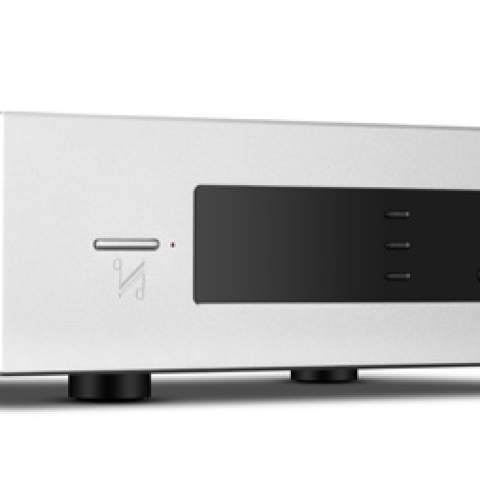
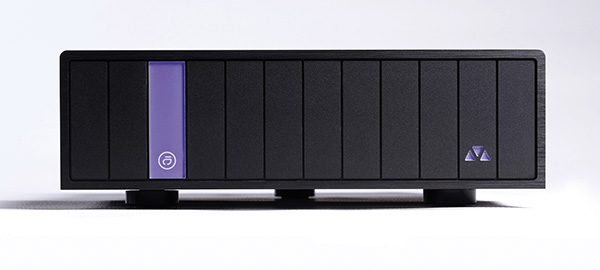
Why lead off with a discussion of Audirvāna—a computer application—when we're reviewing a server-streamer? Because the server-streamer in question—the Métronome DSAS—runs Audirvāna. It is the first to do so, though a half-dozen or so others are expected to follow soon, with more on the way. The DSAS does what other server-streamers do: It manages local files and music streams and sends music data to a DAC. It is part of Métronome's "Digital Sharing" range of components: DSAS stands for Digital Sharing Audio Server. The series includes a CD transport (the DST), a Roon Ready + UPnP server-streamer (the DSS 2), and a DAC (the DSC mini). They are all in metal cases with a small, 10" × 10" footprint. The DSAS has a minimalist look, including its front face. The only front-panel control is a status light that, when you touch it, wakes the unit up or puts it to sleep. The back panel is also simple as these things go: It includes an IEC power cord input, a power switch, USB-A and USB-C ports for connecting external storage—both support USB 3.0 speeds—a 1Gbps Ethernet port, a dual-band Wi-Fi antenna, and a dedicated USB-A port for sending music data to a DAC. It's important to note that USB is the DSAS's only output.
The DSAS stands on three sturdy, prominent feet configured in a triangle—two in the front, one in the back—which provide a strong mechanical coupling to any surface it is sitting on. In this respect at least, it doesn't rock.
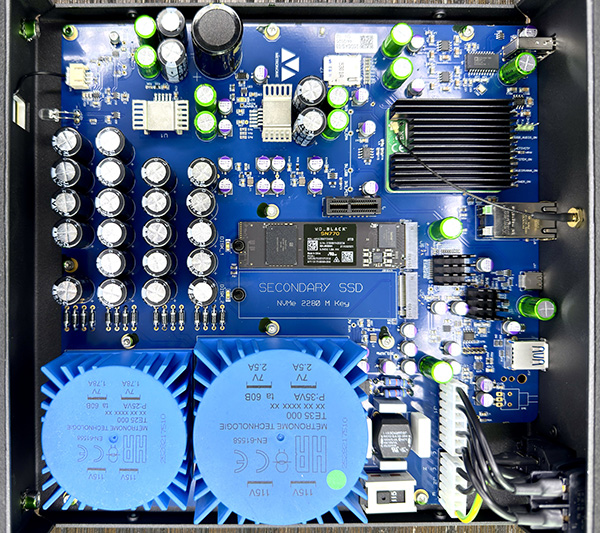
 The unit includes internal storage; a 2TB SSD is standard. Meddy Dufrennes, Métronome's product manager for the DSAS project, told me that the included 2TB NVMe SSD holds the Audirvāna database and user preferences, so it should not be replaced. A second slot has been tested with a 2TB NVMe SSD and will probably work with even bigger NVMe SSD cards.
Setting up the DSAS was simple: I connected an Ethernet cable from my router to the DSAS, powered it up, and located the DSAS on the Audirvāna Remote app. If your network is well and simply configured, the app will locate the device promptly, and you're off to the races. A purely wireless setup is also possible, though Stereophile recommends a wired connection (and a simple, well-configured local network) for lossless and hi-rez music streaming.
Moving files to the DSAS's internal storage was also simple: I accessed the internal drive on a computer on the network and dragged and dropped music into the folder labeled "Music" in the DSAS network share (footnote 1). For transferring music, a wired network connection is preferred because it is faster.
Next up: streaming services. Tidal, Qobuz, HIGHRESAUDIO (HRA), and Presto Music are supported. Connecting them is as simple as logging into the services through the Audirvāna Remote app. Internet radio and podcasts are also supported.
Once this is done, all you need to do to start playing music is connect your DAC to the DSAS via the dedicated USB connection and select an album or track to play.
The unit includes internal storage; a 2TB SSD is standard. Meddy Dufrennes, Métronome's product manager for the DSAS project, told me that the included 2TB NVMe SSD holds the Audirvāna database and user preferences, so it should not be replaced. A second slot has been tested with a 2TB NVMe SSD and will probably work with even bigger NVMe SSD cards.
Setting up the DSAS was simple: I connected an Ethernet cable from my router to the DSAS, powered it up, and located the DSAS on the Audirvāna Remote app. If your network is well and simply configured, the app will locate the device promptly, and you're off to the races. A purely wireless setup is also possible, though Stereophile recommends a wired connection (and a simple, well-configured local network) for lossless and hi-rez music streaming.
Moving files to the DSAS's internal storage was also simple: I accessed the internal drive on a computer on the network and dragged and dropped music into the folder labeled "Music" in the DSAS network share (footnote 1). For transferring music, a wired network connection is preferred because it is faster.
Next up: streaming services. Tidal, Qobuz, HIGHRESAUDIO (HRA), and Presto Music are supported. Connecting them is as simple as logging into the services through the Audirvāna Remote app. Internet radio and podcasts are also supported.
Once this is done, all you need to do to start playing music is connect your DAC to the DSAS via the dedicated USB connection and select an album or track to play.
 The hardware
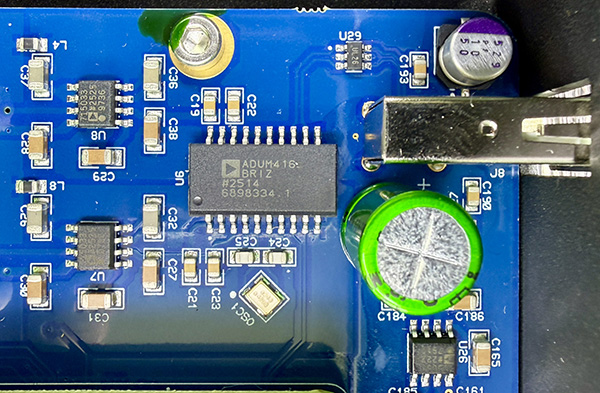
The Métronome DSAS has been designed and built from the ground up to optimally run Audirvāna—nothing else. The fact that there's an AUDIRVANA_ON status LED on the motherboard is the clearest indication this is a machine built for a single purpose. Power is handled by two linear supplies: One feeds the USB-Audio port and the system processor; the other powers the storage components including the USB IN ports and the NVMe SSD slots. Computing tasks are handled by a Raspberry Pi Compute Module 4. I told Meddy that I was concerned that the Raspberry Pi might not provide sufficient computing power. He responded that the processing power is ample for the Audirvāna feature set, including upsampling and the newly added DSP (footnote 2). Over the course of the review, I found this to be true. The operating system resides on a 32GB microSD card mounted directly on the main circuit board (footnote 3). The aforementioned 2TB NVMe SSD is the default bin for local music storage. The DSAS is fanless—silent—which is important if you're going to place it in your audio rack, which, in contrast to a laptop, is how it is intended to be used. That USB Audio DAC connection port is galvanically isolated and reclocked (footnote 4) to deliver the purest, lowest-noise data transfer possible. Galvanic isolation minimizes the electrical noise passed on to the DAC. A high-quality clock is important because timing errors are equivalent to noise when it comes to causing jitter that can degrade digital conversion.
You've surely used USB with a computer, for example, to connect to external storage. If you have, your experience has almost certainly been error free. It is natural to assume that the same holds true for USB Audio. However, in contrast to the USB protocols used for storage, the USB Audio protocol is not error-correcting. The protocol can detect and mute packets with errors, but there is no mechanism to request retransmission. What the protocol does include is flow control: two-way communication between the "host" (the DSAS) and the "device" (the DAC) to negotiate the transmission speed so that the buffer on the DAC side never empties or overflows. The net result of this and other factors, as many have found out through trial and error, is that high-quality USB cables really do make a difference in the sound such devices produce. This is true for any device that connects to a DAC using USB Audio.
 The software
I started to dabble in serious computer-based music playback in 2011. Back then, that meant ripping CDs to my Mac and playing them into my headphone setup. I heard about Audirvāna and learned it was intended to improve the quality of playback on the Mac. I bought a license for Audirvāna Plus in November of that year. At the time, it was a simple app that would play a list of tracks, achieving better sound by connecting directly to the DAC. It worked well and sounded much better than iTunes. I have been an Audirvāna user ever since. I connected with Damien Plisson, creator of Audirvāna and now the firm's CEO and CTO. Damien explained the origin of the platform. "I am an engineer and developer at heart. I started this as a personal side project because I wanted to rip my classical collection of CDs and got curious about optimizing playback on a computer. I shared a prototype online in 2010 that was a simple playlist player, taking control of the audio output only. It was very welcomed by the community, especially in Japan. I decided to improve it and commercialize it. It became an add-on to iTunes in 2012. Since 2015, I have dedicated myself full-time to building the software it is now."
Damien went on to describe his design priorities and details: "The focus has always been to apply the principles of 'silent component' and 'shortest path' to the computer hardware platform. I always seek ways to avoid any unnecessary processor activity during playback and get the most direct access to the audio output. When Apple introduced the M-series processors, it opened for me new options to further optimize the audio playback path. On Windows, I worked using the Kernel streaming mode that gives the highest potential for optimization.
"In 2014, the app was enriched with a library management solution—separate from iTunes—with its own interface. In 2015, Qobuz streaming was integrated, soon followed by Tidal and HRA"—that's HIGHRESAUDIO—"in 2016 and Presto Music in 2025. Version 3"—Damien was referring to Audirvāna 3, not the current Audirvāna Studio 3—"was released in 2017, adding MQA support, new oversampling algorithms, and UPnP/DLNA capability. Audirvāna introduced an iOS remote app in 2015, followed in 2017 by the introduction of a Windows version of the player as well as the Android version of the Remote app. The Linux version was developed in 2024, allowing integration of Audirvāna on NAS devices and Linux-based audio servers." This last move was, Damien said, "motivated by the observation that many music lovers simply don't want to use their computer as a source." Voilà, the DSAS.
"You can think of the Linux version on the DSAS—and other servers—as an optimal Audirvāna implementation on a computer entirely dedicated to audio, with audiophile-grade hardware components with less insulation compromise and a quiet power supply. Each operating system manages the audio output in different ways, and I had to work and optimize the playback for each one. On Linux, we take exclusive, direct access of the ALSA output (footnote 5).
"The current platform, Audirvāna Studio and Origin (footnote 6), was released in 2021 and updated in 2022 with [internet] radio and podcasts, Chromecast audio, Audio Scan, and the tablet-mode Remote app."
The latest major update of Audirvāna Studio—version 3—was released this March. Audirvāna Studio v3.0.2 was used during this review. It includes a redesigned interface that Audirvāna calls Allegro, which streamlines the user experience. It adds substantial new Digital Signal Processing (DSP) functionality: 10-band Parametric Equalization; Convolution Engine for room correction; Crossfeed for headphone listening; and Balance, which is, as you might guess, a Left-Right channel-level adjustment. These new DSP features are, Damien remarked, "really something I am proud of. I wanted to introduce this in Audirvāna for some years now, but I had to start from scratch because I was leaving it until then to external plug-ins. I developed the EQ myself, which I wanted to stay easy to use, but I think is really professional grade in terms of audio quality. As for the Convolution and Crossfeed, I worked with a signal-processing expert who is really into audio, so we have been able to meet our specs and really optimize the code."
The Audirvāna team continues to improve the platform. Just since the launch of Studio v3, updates have improved the Remote app, and DSP supports both SoX and r8brain upsampling algorithms to higher-rate PCM and to DSD. The latest Audirvāna also supports plug-ins, but the Audirvāna in the DSAS can't use them because the relevant plug-ins cannot be used "headless"—that is, without a display.
What other Audirvāna features are unsupported on the DSAS? Just one: metadata editing, which is currently supported on desktop platforms only, not on the Remote app. Damien told me, however, that app-based metadata editing will be added with an update later this year.
Footnote 1: The manual indicates that the fastest way to do this is to connect a USB drive to either USB IN port and follow the same procedure from your computer between the two network drives. I tried this, but it was slower than the network process I just detailed. For fastest performance, use a wired connection to transfer the files. Métronome is considering changing the manual to reflect this. Footnote 2: I have engaged all DSP functions as well as DSD128 upsampling—the most computationally heavy of the upsampling algorithms—without issues.
Footnote 3: A microSD-to-USB-A adapter is provided in case it becomes necessary to reflash the microSD system card in the rare circumstance that the card becomes corrupted.
Footnote 4: According to Meddy, the USB output "uses an [Analog Devices] ADuM4165 isolator/reclocker, providing full galvanic isolation and clock regeneration."
Footnote 5: The Advanced Linux Sound Architecture (ALSA) is the standard Linux kernel framework providing device drivers for sound cards, MIDI, and audio interfaces. ALSA manages hardware devices directly, providing low-latency and high-quality audio.
Footnote 6: Audirvāna Origin only supports local playback; it is a single-payment option, no subscription required.
Why lead off with a discussion of Audirvāna—a computer application—when we're reviewing a server-streamer? Because the server-streamer in question—the Métronome DSAS—runs Audirvāna. It is the first to do so, though a half-dozen or so others are expected to follow soon, with more on the way. The DSAS does what other server-streamers do: It manages local files and music streams and sends music data to a DAC. It is part of Métronome's "Digital Sharing" range of components: DSAS stands for Digital Sharing Audio Server. The series includes a CD transport (the DST), a Roon Ready + UPnP server-streamer (the DSS 2), and a DAC (the DSC mini). They are all in metal cases with a small, 10" × 10" footprint. The DSAS has a minimalist look, including its front face. The only front-panel control is a status light that, when you touch it, wakes the unit up or puts it to sleep. The back panel is also simple as these things go: It includes an IEC power cord input, a power switch, USB-A and USB-C ports for connecting external storage—both support USB 3.0 speeds—a 1Gbps Ethernet port, a dual-band Wi-Fi antenna, and a dedicated USB-A port for sending music data to a DAC. It's important to note that USB is the DSAS's only output.
The unit includes internal storage; a 2TB SSD is standard. Meddy Dufrennes, Métronome's product manager for the DSAS project, told me that the included 2TB NVMe SSD holds the Audirvāna database and user preferences, so it should not be replaced. A second slot has been tested with a 2TB NVMe SSD and will probably work with even bigger NVMe SSD cards.
Setting up the DSAS was simple: I connected an Ethernet cable from my router to the DSAS, powered it up, and located the DSAS on the Audirvāna Remote app. If your network is well and simply configured, the app will locate the device promptly, and you're off to the races. A purely wireless setup is also possible, though Stereophile recommends a wired connection (and a simple, well-configured local network) for lossless and hi-rez music streaming.
The hardwareThe Métronome DSAS has been designed and built from the ground up to optimally run Audirvāna—nothing else. The fact that there's an AUDIRVANA_ON status LED on the motherboard is the clearest indication this is a machine built for a single purpose. Power is handled by two linear supplies: One feeds the USB-Audio port and the system processor; the other powers the storage components including the USB IN ports and the NVMe SSD slots. Computing tasks are handled by a Raspberry Pi Compute Module 4. I told Meddy that I was concerned that the Raspberry Pi might not provide sufficient computing power. He responded that the processing power is ample for the Audirvāna feature set, including upsampling and the newly added DSP (footnote 2). Over the course of the review, I found this to be true. The operating system resides on a 32GB microSD card mounted directly on the main circuit board (footnote 3). The aforementioned 2TB NVMe SSD is the default bin for local music storage. The DSAS is fanless—silent—which is important if you're going to place it in your audio rack, which, in contrast to a laptop, is how it is intended to be used. That USB Audio DAC connection port is galvanically isolated and reclocked (footnote 4) to deliver the purest, lowest-noise data transfer possible. Galvanic isolation minimizes the electrical noise passed on to the DAC. A high-quality clock is important because timing errors are equivalent to noise when it comes to causing jitter that can degrade digital conversion.
The softwareI started to dabble in serious computer-based music playback in 2011. Back then, that meant ripping CDs to my Mac and playing them into my headphone setup. I heard about Audirvāna and learned it was intended to improve the quality of playback on the Mac. I bought a license for Audirvāna Plus in November of that year. At the time, it was a simple app that would play a list of tracks, achieving better sound by connecting directly to the DAC. It worked well and sounded much better than iTunes. I have been an Audirvāna user ever since. I connected with Damien Plisson, creator of Audirvāna and now the firm's CEO and CTO. Damien explained the origin of the platform. "I am an engineer and developer at heart. I started this as a personal side project because I wanted to rip my classical collection of CDs and got curious about optimizing playback on a computer. I shared a prototype online in 2010 that was a simple playlist player, taking control of the audio output only. It was very welcomed by the community, especially in Japan. I decided to improve it and commercialize it. It became an add-on to iTunes in 2012. Since 2015, I have dedicated myself full-time to building the software it is now."
Footnote 1: The manual indicates that the fastest way to do this is to connect a USB drive to either USB IN port and follow the same procedure from your computer between the two network drives. I tried this, but it was slower than the network process I just detailed. For fastest performance, use a wired connection to transfer the files. Métronome is considering changing the manual to reflect this. Footnote 2: I have engaged all DSP functions as well as DSD128 upsampling—the most computationally heavy of the upsampling algorithms—without issues.