The speed with which audiophiles have adopted a computer of some sort as their primary source of recorded music might be thought breathtaking. But with the ubiquitous Apple iPod painlessly persuading people to get used to the idea of storing their music libraries on computer hard drives, the next logical step was to access those libraries in listening rooms as well as on the move. A few months back, I wrote a basic guide to the various strategies for getting the best sound from a computer: "Music Served: Extracting Music from your PC." Since then, Minnesota manufacturer Bel Canto Design has released a product that aims to simplify matters even further.
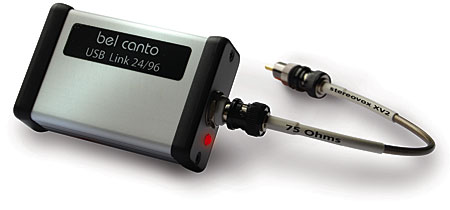 The USB Link 24/96 is a small box, about the size and weight of a pack of cigarettes, with a USB Type B jack at one end and a 75 ohm BNC jack at the other. The user hooks the Bel Canto's USB input up to a USB port on his PC or Mac computer, which supplies power to the Link, thus illuminating a red LED next to the Link's BNC jack. He then uses a 9" length (footnote 1) of Stereovox XV2 S/PDIF datalink (supplied) to feed his audiophile DAC. (This cable is fitted with BNC connectors at both ends; an RCA adapter is provided.) No driver programs are required—the Link uses the native drivers provided with the Mac OSX and Windows operating systems. The computer automatically recognizes the Link as "Bel Canto 2496 USB," and once the Link has been selected as the default audio output device, programs such as iTunes will direct their output to it, and thence to the owner's high-end system.
The Bel Canto USB Link 24/96 disables the computer's volume control, ensuring that the maximum sound quality is obtained from music files. The sample rates supported run up to 96kHz, with a depth of 24 bits.
Under the hood
The USB Link 24/96 is a small box, about the size and weight of a pack of cigarettes, with a USB Type B jack at one end and a 75 ohm BNC jack at the other. The user hooks the Bel Canto's USB input up to a USB port on his PC or Mac computer, which supplies power to the Link, thus illuminating a red LED next to the Link's BNC jack. He then uses a 9" length (footnote 1) of Stereovox XV2 S/PDIF datalink (supplied) to feed his audiophile DAC. (This cable is fitted with BNC connectors at both ends; an RCA adapter is provided.) No driver programs are required—the Link uses the native drivers provided with the Mac OSX and Windows operating systems. The computer automatically recognizes the Link as "Bel Canto 2496 USB," and once the Link has been selected as the default audio output device, programs such as iTunes will direct their output to it, and thence to the owner's high-end system.
The Bel Canto USB Link 24/96 disables the computer's volume control, ensuring that the maximum sound quality is obtained from music files. The sample rates supported run up to 96kHz, with a depth of 24 bits.
Under the hood
The USB Link 24/96 is housed in a small aluminum extrusion with black plastic endcaps. Undoing the four Phillips-head screws at each end allows the multilayer circuit board to be slid out. All the components used are surface-mount types. The USB data are fed to a Texas Instruments TAS1020 chip, which converts the audio data to i2C format. The TAS1020 is clocked by an adjacent 6MHz crystal oscillator; despite its thumbnail size, this complex TI chip includes an embedded microprocessor that runs, I believe, code developed by Centrance, obviating the need for the host computer to run a proprietary driver program with the USB Link. The i2C audio data are then fed to a Crystal CS8406 chip, which converts them to the S/PDIF serial format and drives a small pulse transformer adjacent to the output BNC jack, in order to galvanically isolate the computer and audio system and thus avoid injecting high-frequency noise via the linked grounds. Setup
While the Bel Canto USB Link 24/96 is a simple device, reviewing it wasn't so simple. Not only are there two different computing platforms to be considered, PC and Apple Macintosh, there are also the various flavors of their operating systems, and the multitude of possible music-playback programs. I settled on using the Bel Canto with two computers: a dual-core Pentium PC running Windows XP with Service Pack 3, and a G4 Mac mini (footnote 2) running OS10.4.11. I played music files using iTunes 8.0 and the open-source Audacity DAW freeware, both of which are available for both computer flavors. On the Mac, I also used my regular music-editing program, BIAS Peak Pro 6.0.5; on the PC, I also used Winamp and Foobar2000, both of which I prefer to iTunes on that platform because they allow the audio data path to be optimized, and Windows Media Player. With the Mac, the Bel Canto needs to be selected with the Audio Midi Set-Up utility and have its sample rate set to match that of the music to be played. (Go to Applications/Utilities/Audio Midi Set-Up; in the right-hand portion of the panel, select the Bel Canto as the output device; then click on Properties at the left.) If you don't do this, the Link has no way of knowing what the file's sample rate is—unlike a specific audio serial format, such as AES/EBU or S/PDIF, USB doesn't include a data field to specify sample rate, but defaults to the sample rate of whatever was the last file played, using the host computer's sample-rate converter to transcode the audio data. Some programs, such as Peak, use the Mac's CoreAudio interface to switch the USB datastream to whatever is required, but with iTunes on the Mac, you need to manually change the sample rate with Audio Midi Set-Up whenever you select a file with a different sample rate. Otherwise, you'll get no audible benefit from playing a hi-rez file.
Windows XP is more friendly in this respect; the sample rate of the USB Link 24/96 automatically follows that of the audio file selected with Windows Media Player, Foobar2000, and Winamp (though not with iTunes, at least that I could see). None of my PCs runs Windows Vista, but during the review period, Erick Lichte, musical director of Cantus, visited so that we could do some further work mixing the group's next CD. Erick's VAIO laptop runs Vista, and as he had some hi-rez files of pianist Robert Silverman playing Brahms he wanted me to hear, he plugged the USB Link 24/96 into his laptop's USB port, loaded the files into the Soundforge program, and pressed Play.
Nothing. No matter what Erick did, we couldn't get the files, which were recorded at the sample rate of 88.2kHz, to play through the Bel Canto, even though CD files did. It turns out that Vista's audio codec has a bug that doesn't allow playback at 88.2kHz.
Sound quality
As a format converter, Bel Canto's USB Link 24/96 shouldn't have a sound of its own, of course; it should be a neutral intermediary. I mainly used Bel Canto's own e.One DAC3 for my auditioning, as that would seem a natural match. As you can read in my November 2007 review, the DAC3 also has a USB data input. Why, then, should a DAC3 owner consider a USB Link 24/96? Because the DAC3 is limited to 16-bit files sampled at 44.1kHz. The Link allows a DAC3 to handle computer-sourced hi-rez files, and I found it did so with ease, other than occasionally emitting three or four clicks when I switched sample rates on the Mac.
I couldn't hear much difference in sound quality between feeding the DAC3 USB data sourced from iTunes on the Mac as it played an AIF or WAV file, and feeding it AES/EBU data from the original CD as played by my Ayre C-5xe universal player. Perhaps the Ayre produced a slightly more solid-feeling bass, with slightly better-defined, better-extended low frequencies, but it was not a night-or-day difference. Changing from the DAC3 to my early sample of the Benchmark DAC1, even that difference between the two sources disappeared, though I slightly preferred the sound of the two Bel Canto devices overall to that of the USB Link 24/96 or Ayre driving the Benchmark, which had a slightly less silky high end. My own 24-bit/88.2kHz files, such as the hi-rez masters for Cantus's While You Are Alive (CD, Cantus CTS-1208) and Attention Screen's Live at Merkin Hall (CD, Stereophile STPH018-2), sounded convincingly better than the "Red Book" CD versions, with my Mac mini feeding the combination of Bel Canto's USB Link and DAC3.
Footnote 1: The conventional wisdom with datalinks is that they should be either very short, around 9", or at least 2m in length, to minimize jitter due to impedance-mismatch-induced reflections. Footnote 2: A major advantage of the Mac mini is that although this has a fan, this rarely comes on, unless the computer is doing some major number crunching. And even when it does come on, it is still quiet enough not to be heard. It is not a big deal, therefore, to place a Mac mini adjacent to your D/A processor in the equipment rack, controlling iTunes with the Remote app running on an iPod Touch or iPhone. By contrast, the typical PC is too noisy for use in the same room as a high-end system, unless you can put it in a closet.
The USB Link 24/96 is a small box, about the size and weight of a pack of cigarettes, with a USB Type B jack at one end and a 75 ohm BNC jack at the other. The user hooks the Bel Canto's USB input up to a USB port on his PC or Mac computer, which supplies power to the Link, thus illuminating a red LED next to the Link's BNC jack. He then uses a 9" length (footnote 1) of Stereovox XV2 S/PDIF datalink (supplied) to feed his audiophile DAC. (This cable is fitted with BNC connectors at both ends; an RCA adapter is provided.) No driver programs are required—the Link uses the native drivers provided with the Mac OSX and Windows operating systems. The computer automatically recognizes the Link as "Bel Canto 2496 USB," and once the Link has been selected as the default audio output device, programs such as iTunes will direct their output to it, and thence to the owner's high-end system.
The Bel Canto USB Link 24/96 disables the computer's volume control, ensuring that the maximum sound quality is obtained from music files. The sample rates supported run up to 96kHz, with a depth of 24 bits.
The USB Link 24/96 is housed in a small aluminum extrusion with black plastic endcaps. Undoing the four Phillips-head screws at each end allows the multilayer circuit board to be slid out. All the components used are surface-mount types. The USB data are fed to a Texas Instruments TAS1020 chip, which converts the audio data to i2C format. The TAS1020 is clocked by an adjacent 6MHz crystal oscillator; despite its thumbnail size, this complex TI chip includes an embedded microprocessor that runs, I believe, code developed by Centrance, obviating the need for the host computer to run a proprietary driver program with the USB Link. The i2C audio data are then fed to a Crystal CS8406 chip, which converts them to the S/PDIF serial format and drives a small pulse transformer adjacent to the output BNC jack, in order to galvanically isolate the computer and audio system and thus avoid injecting high-frequency noise via the linked grounds. Setup
While the Bel Canto USB Link 24/96 is a simple device, reviewing it wasn't so simple. Not only are there two different computing platforms to be considered, PC and Apple Macintosh, there are also the various flavors of their operating systems, and the multitude of possible music-playback programs. I settled on using the Bel Canto with two computers: a dual-core Pentium PC running Windows XP with Service Pack 3, and a G4 Mac mini (footnote 2) running OS10.4.11. I played music files using iTunes 8.0 and the open-source Audacity DAW freeware, both of which are available for both computer flavors. On the Mac, I also used my regular music-editing program, BIAS Peak Pro 6.0.5; on the PC, I also used Winamp and Foobar2000, both of which I prefer to iTunes on that platform because they allow the audio data path to be optimized, and Windows Media Player. With the Mac, the Bel Canto needs to be selected with the Audio Midi Set-Up utility and have its sample rate set to match that of the music to be played. (Go to Applications/Utilities/Audio Midi Set-Up; in the right-hand portion of the panel, select the Bel Canto as the output device; then click on Properties at the left.) If you don't do this, the Link has no way of knowing what the file's sample rate is—unlike a specific audio serial format, such as AES/EBU or S/PDIF, USB doesn't include a data field to specify sample rate, but defaults to the sample rate of whatever was the last file played, using the host computer's sample-rate converter to transcode the audio data. Some programs, such as Peak, use the Mac's CoreAudio interface to switch the USB datastream to whatever is required, but with iTunes on the Mac, you need to manually change the sample rate with Audio Midi Set-Up whenever you select a file with a different sample rate. Otherwise, you'll get no audible benefit from playing a hi-rez file.
As a format converter, Bel Canto's USB Link 24/96 shouldn't have a sound of its own, of course; it should be a neutral intermediary. I mainly used Bel Canto's own e.One DAC3 for my auditioning, as that would seem a natural match. As you can read in my November 2007 review, the DAC3 also has a USB data input. Why, then, should a DAC3 owner consider a USB Link 24/96? Because the DAC3 is limited to 16-bit files sampled at 44.1kHz. The Link allows a DAC3 to handle computer-sourced hi-rez files, and I found it did so with ease, other than occasionally emitting three or four clicks when I switched sample rates on the Mac.
Footnote 1: The conventional wisdom with datalinks is that they should be either very short, around 9", or at least 2m in length, to minimize jitter due to impedance-mismatch-induced reflections. Footnote 2: A major advantage of the Mac mini is that although this has a fan, this rarely comes on, unless the computer is doing some major number crunching. And even when it does come on, it is still quiet enough not to be heard. It is not a big deal, therefore, to place a Mac mini adjacent to your D/A processor in the equipment rack, controlling iTunes with the Remote app running on an iPod Touch or iPhone. By contrast, the typical PC is too noisy for use in the same room as a high-end system, unless you can put it in a closet.